Written by
Corentin Mrejen
This is Part 2 of our series on building agentic AI systems for quantitative analysis. In Part 1, we introduced the ReAct pattern and Model Context Protocol, the foundation for autonomous reasoning and action execution. Now we address the third characteristic of true agency: context-aware intelligence through company knowledge integration. This article explains how we implemented retrieval-augmented generation (RAG) using vector databases and semantic embeddings, transforming a generic chatbot into an agent that understands your organization's models, methodologies, and domain expertise.
The Missing Piece: Company-Specific Intelligence
In Part 1, we built systems that reason and act autonomously. An actuary can ask "Test for regime shifts in Q3-Q4" and receive comprehensive statistical analysis with breakpoint detection. A quant can request "Compute rolling VaR with appropriate window selection" and the system determines methodology, executes analyses, and synthesizes findings.
This is powerful. But something critical is missing. The system knows nothing about your organization. When you ask about model validation procedures, it generates generic responses based on general statistical knowledge. When you reference your company's credit risk framework, it has no understanding of your specific methodology. When you need to align analysis with internal governance standards, it cannot access your model risk management documentation.
The system operates in isolation from organizational knowledge. Your internal model documentation, validation frameworks, data dictionaries, entity definitions, and analytical standards exist in SharePoint, Azure Blob Storage, or network drives. The agent cannot access them. Every interaction starts from generic statistical principles rather than your organization's established practices.
This gap is what we're closing. Context-aware intelligence through retrieval-augmented generation that integrates company-specific knowledge directly into analytical reasoning.
What Company Knowledge Integration Enables
Before diving into technical implementation, consider what becomes possible when your agent accesses organizational knowledge. These aren't incremental improvements. They represent fundamental shifts in how analytical infrastructure supports your workflow.
Model Documentation Awareness
Your organization maintains detailed documentation for quantitative models. Credit risk models specify how missing data should be handled, what imputation methodologies are approved, which distributional assumptions are validated. Fraud detection models document feature engineering approaches, threshold calibration procedures, and performance monitoring requirements.
When this documentation lives in the agent's knowledge base, analytical requests become contextualized. You ask: "How should I handle missing credit scores in this dataset?" Rather than generic guidance, the agent retrieves your company's Credit Risk Policy (version 2.3, section 4.2) and responds: "Based on your Model Risk Management framework, missing credit scores should be imputed using median values stratified by account age and product type. For accounts under 12 months, use product-specific medians. For mature accounts, apply overall portfolio medians. Document imputation methodology in the Model Validation Report per MRM Policy section 7.1."
The response is grounded in your organization's standards rather than generic best practices.
Data Dictionary Integration
Enterprise data landscapes are complex. Datasets contain dozens or hundreds of fields with organization-specific meanings. What does "exposure_adjusted_premium" mean in your claims data? How is "credit_utilization_ratio" calculated in your risk models? Which fields require specific transformations before analysis?
When the agent accesses your data dictionaries, it understands these semantics. You upload claims data and ask for loss ratio analysis. The agent retrieves your Claims Data Dictionary and recognizes: "The 'exposure_adjusted_premium' field represents written premium adjusted for policy term and coverage limits. This field should be used as the denominator for loss ratios per the Actuarial Standards document. For quarterly analysis, apply seasonal adjustment factors documented in Q4 Reporting Guidelines."
The agent doesn't just perform generic calculations. It applies your organization's specific definitions and procedures automatically.
Methodology Consistency
Organizations develop standardized analytical approaches over time. Your quarterly validation workflow follows specific sequences. Your hypothesis testing uses approved significance thresholds. Your risk metrics computation applies organization-specific adjustments.
With access to methodology documentation, the agent maintains consistency automatically. When you request factor stability testing, it retrieves your Factor Analysis Methodology Guide and applies the documented approach: 60-day rolling windows for equity factors, 90-day windows for fixed income factors, regime detection thresholds calibrated to your portfolio characteristics, reporting formats aligned with your Risk Committee requirements.
Analytical outputs become automatically aligned with organizational standards without manual specification each time.
The Architecture: Retrieval-Augmented Generation
Implementing company knowledge integration requires solving three interconnected challenges. First, how do we represent documents in ways that enable semantic understanding? Second, how do we efficiently search thousands of documents to find relevant context? Third, how do we inject retrieved knowledge into the agent's reasoning process?
Our solution implements Retrieval-Augmented Generation (RAG) through three core components: semantic embeddings for document representation, vector databases for efficient similarity search, and context injection for knowledge integration. Together, these create agents with genuine understanding of organizational knowledge.
Component 1: Semantic Embeddings
The first challenge is representation. How do you convert a 50-page Model Risk Management policy into a form that enables the system to recognize when it's relevant? Traditional keyword search fails. Searching for "missing data" won't find sections discussing "imputation methodologies" or "data quality requirements" despite semantic similarity.
We solve this through semantic embeddings. Each document (or document chunk for longer files) is converted into a high-dimensional vector representation that captures semantic meaning. Our implementation uses text-embedding-ada-002 from Azure OpenAI, which generates 1536-dimensional vectors from text.
These vectors have a powerful property: semantically similar text maps to nearby points in vector space. A section discussing "missing value imputation" and another discussing "handling incomplete data" produce similar embeddings, even though their exact wording differs. When you query "How to handle missing credit scores?" the system can find relevant documentation discussing imputation, data quality, or validation requirements because these concepts are semantically related.
The embedding process is straightforward. Your Model Risk Management policy is chunked into manageable sections (typically 1000 characters with 200-character overlap to preserve context). Each chunk is sent to Azure OpenAI's embedding API, which returns a 1536-dimensional vector. These vectors are stored alongside the original text and metadata (document source, section, company, document type) in a vector database.
Component 2: Vector Database (Chroma)
Storing embeddings is straightforward. Searching them efficiently at scale is harder. When you ask a question, the system must search potentially thousands of document chunks to find relevant context. Comparing your query vector against every stored vector becomes computationally prohibitive as your knowledge base grows.
We implemented ChromaDB, a specialized vector database optimized for similarity search. ChromaDB uses approximate nearest neighbor algorithms (specifically, HNSW: Hierarchical Navigable Small World graphs) that enable sub-linear search complexity. Rather than comparing against every stored vector, HNSW constructs a navigable graph structure where similar vectors cluster together. Searching this graph identifies relevant documents orders of magnitude faster than brute-force comparison.
ChromaDB supports flexible deployment architectures from development environments to enterprise-scale production systems with high availability, concurrent access, and operational monitoring. The system includes metadata filtering capabilities that scope searches to specific document types, companies, or domains improving both retrieval precision and performance.
Our ChromaDB instance stores document chunks with rich metadata:
{ "id": "credit_risk_policy_v2.3_chunk_5", "embedding": [0.123, -0.456, 0.789, ...], // 1536 dimensions "document": "Missing credit scores must be imputed using...", "metadata": { "source": "azure://company-docs/models/credit_risk_policy_v2.3.md", "filename": "credit_risk_policy_v2.3.md", "company": "Your Organization", "doc_type": "model_policy", "chunk_index": 5, "total_chunks": 23 } }
Search operations are remarkably efficient. Typical retrieval latency is 10-50ms for knowledge bases containing tens of thousands of document chunks. The system scales sub-linearly: doubling the knowledge base size does not double search time.
Component 3: Context Injection and RAG
Having embedded documents and built efficient search infrastructure, the final challenge is integration. How does retrieved context influence the agent's reasoning? This is where Retrieval-Augmented Generation (RAG) completes the picture.
RAG is an architectural pattern where retrieved information augments the LLM's prompt, providing relevant knowledge that shapes its reasoning. Here's how it works in practice. You ask: "How should I validate factor stability in our equity risk model?" The system embeds your query, producing a 1536-dimensional vector. This query vector is used to search ChromaDB for similar document chunks. ChromaDB returns the top-k most relevant sections (typically 3-5 documents), ranked by semantic similarity.
Results might include: Your organization's Factor Analysis Methodology Guide (section discussing stability testing procedures), the Equity Risk Model Validation Report (documenting previous validation approaches), and Model Risk Management Policy (governance requirements for stability testing). Each result includes a similarity score indicating relevance.
This retrieved context is formatted and injected into the system prompt before the LLM processes your query. The augmented prompt now contains:
# Relevant Company Context
## Document (Relevance: 0.87) Source: Factor_Analysis_Methodology_v3.1.md Content: Factor stability testing uses 60-day rolling windows for equity factors. Compute correlations across time windows and test for structural breaks using Chow tests at 95% confidence. Document breakpoints and regime characteristics... ## Document (Relevance: 0.79) Source: Equity_Risk_Model_Validation_2024Q3.pdf Content: Previous stability validation identified regime shift in Q3 2023 where technology factor loading increased from 0.65 to 0.82. Subsequent analyses should account for this structural change... ## Document (Relevance: 0.73) Source: Model_Risk_Management_Policy_v2.0.md Content: All stability tests must be documented in Model Validation Reports with clear identification of methodology, results interpretation, and governance sign-off per section 7.3...The LLM now reasons with full awareness of your organizational context. Its response incorporates your documented methodologies, references previous validation work, and aligns with governance requirements. The agent isn't guessing about best practices. It's applying your organization's established standards.
Ingesting Company Knowledge: Flexible Document Loading
RAG's power depends on knowledge base quality. The system can only retrieve what it has indexed. Our implementation provides flexible ingestion from multiple sources, enabling integration with your existing document infrastructure.
Local Filesystem Ingestion
The simplest approach: point the ingestion tool at a directory containing your documentation. The system recursively discovers supported file types (Markdown, plain text, PDF, JSON), loads content, chunks documents appropriately, generates embeddings, and indexes everything in ChromaDB.
python tools/ingest_documents.py \ --source local \ --path ./company_docs \ --company "Your Organization" \ --doc-type "internal_documentation"
This approach works well for documentation maintained in version-controlled repositories or local file servers. Point the tool at your model documentation directory, analytical guidelines folder, or data dictionary collection. Indexing happens once; the knowledge base persists.
Azure Blob Storage Integration
For enterprise deployments, documentation typically lives in cloud storage. Organizations maintain SharePoint libraries, Azure Blob Storage containers, or network drives with model risk management policies, validation reports, methodology guides, and analytical standards. This is where our implementation becomes genuinely powerful.
Our Azure Blob Storage adapter enables direct ingestion from company blob containers. Authenticate using connection strings or managed identity, specify containers and path prefixes, and the system downloads, chunks, embeds, and indexes documents automatically.
python tools/ingest_documents.py \ --source azure \ --container company-documentation \ --prefix models/credit-risk/ \ --company "Your Organization"
This integration means your agent automatically has access to the same documentation your analysts reference daily. Model validation reports? Indexed. Data dictionaries? Indexed. Governance policies? Indexed. Analytical methodology guides? Indexed. The agent's knowledge base mirrors your organization's documented knowledge, creating genuine company-level intelligence.
Moreover, ingestion is repeatable. When documentation updates (new model policies, revised data dictionaries, updated validation reports), re-run ingestion. The system identifies changed documents, updates embeddings, and maintains currency. Your agent's knowledge stays synchronized with organizational standards.
Document Chunking Strategy
Large documents exceed embedding model token limits and reduce retrieval precision. A 50-page Model Risk Management policy contains dozens of distinct topics. Embedding the entire document produces a generic representation that matches weakly to specific queries.
Our chunking strategy splits documents into semantic units. Default configuration uses 1000-character chunks with 200-character overlap. Overlap preserves context across chunk boundaries, ensuring important information isn't lost at split points. Each chunk is embedded independently, enabling fine-grained retrieval. When you query about missing data handling, the system retrieves the specific policy section discussing imputation rather than the entire policy document.
Chunk size is configurable. For highly structured documents (data dictionaries with clear section boundaries), larger chunks preserve more context. For dense technical content (model equations, validation procedures), smaller chunks improve retrieval precision. The ingestion tool accommodates both approaches.
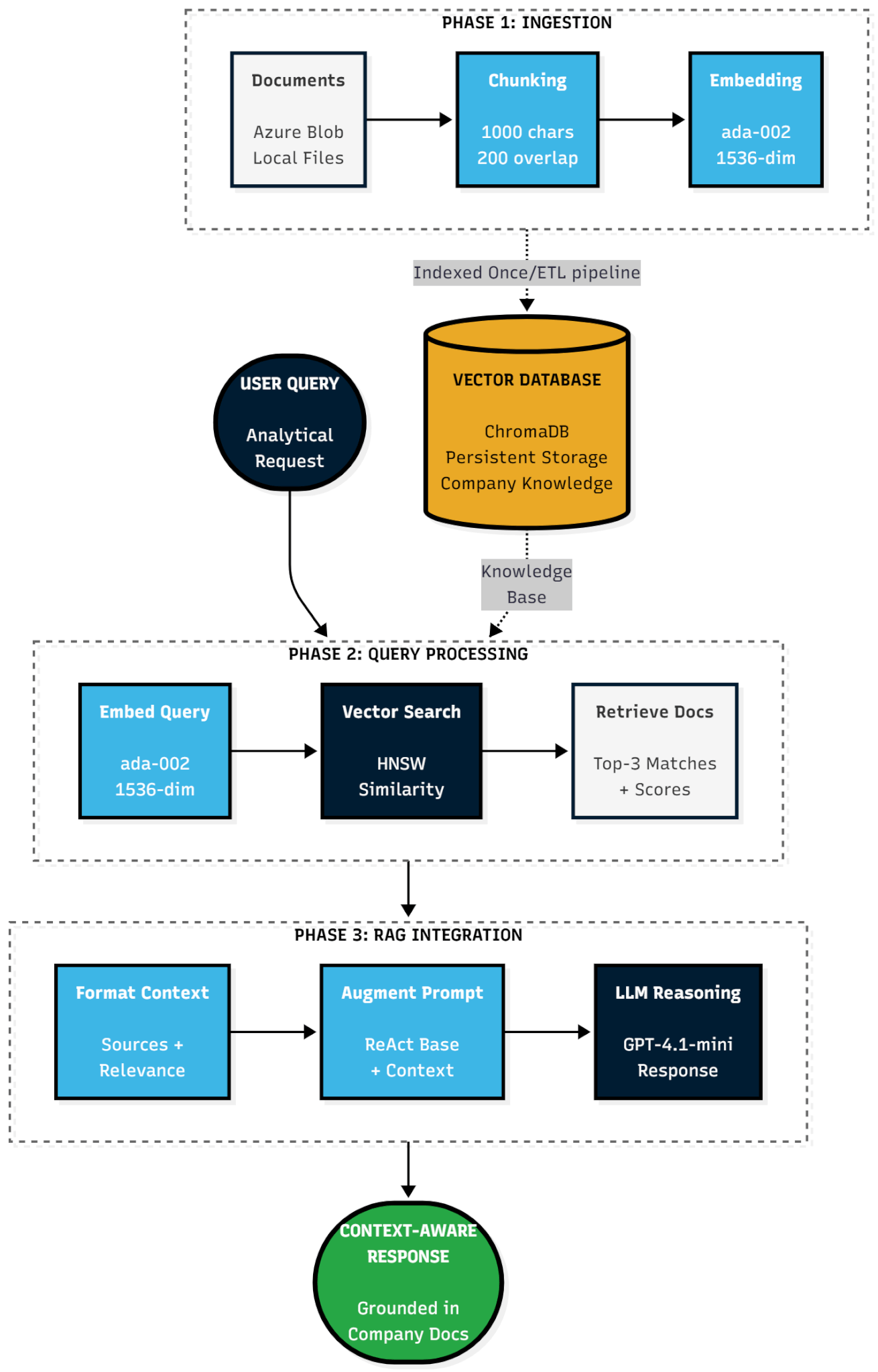
End-to-End RAG Workflow: From Query to Context-Aware Response
Understanding individual components is valuable. Seeing them work together reveals RAG's power. This section traces a complete query through the context-aware architecture.
Step 1: User Query
An actuary asks: "How should I adjust Q4 claims data for seasonal effects in our loss ratio calculation?"
Step 2: Query Embedding
The system sends the query text to Azure OpenAI's text-embedding-ada-002 model. The API returns a 1536-dimensional vector representing the query's semantic meaning. This takes approximately 100-150ms.
Step 3: Vector Search
The query vector searches ChromaDB. The vector database compares it against all indexed document embeddings using approximate nearest neighbor search via HNSW graphs. This takes approximately 30-50ms and returns the top 3 most similar document chunks with their similarity scores.
Results:
1. Quarterly_Reporting_Guidelines_2024.md (similarity: 0.86) "Q4 claims data requires seasonal adjustment factors... Holiday concentration in December typically elevates loss ratios by 15-20%..."
2. Loss_Ratio_Methodology_v3.2.pdf (similarity: 0.79) "Exposure-adjusted premiums should be used as denominators. For Q4, apply 1.15x seasonal factor documented in Actuarial Standards..." 3. Claims_Data_Dictionary_v2.1.json (similarity: 0.73) "'exposure_adjusted_premium' field represents written premium adjusted for policy term and coverage limits. Use for loss ratio denominators..."Step 4: Context Formatting
Retrieved documents are formatted into structured context with relevance scores, source attribution, and content excerpts. This formatted context is ready for prompt injection.
Step 5: Prompt Augmentation
The system prompt (which already contains ReAct instructions and tool descriptions from Part 1) is augmented with the formatted RAG context. The LLM receives both its base instructions and relevant company knowledge.
Step 6: LLM Reasoning with Context
The LLM (GPT-4.1-mini in our deployment) processes the augmented prompt. It reasons with full awareness of your organization's documented standards. Its internal reasoning might be: "The user is asking about Q4 claims adjustments. Based on retrieved context, this organization applies 1.15x seasonal factors for Q4 per Quarterly Reporting Guidelines. The Loss Ratio Methodology specifies using exposure-adjusted premiums as denominators. The Claims Data Dictionary defines which field to use."
Step 7: Context-Aware Response
The agent responds: "Based on your Quarterly Reporting Guidelines (2024 edition), Q4 claims data should be adjusted using a 1.15x seasonal factor to account for holiday concentration effects. For loss ratio calculation, use the 'exposure_adjusted_premium' field as the denominator per your Loss Ratio Methodology (v3.2). This field represents written premium adjusted for policy term and coverage limits, as defined in your Claims Data Dictionary. Apply the seasonal adjustment before computing ratios to ensure consistency with your Actuarial Standards."
This response is grounded in organizational knowledge. It references specific internal documents, applies documented methodologies, and aligns with established practices. The agent isn't providing generic advice. It's operating as an extension of your organization's analytical infrastructure.
What We've Built and What Comes Next
Our current RAG implementation delivers production-grade context awareness through semantic embeddings, efficient vector search, and retrieval-augmented generation. The system indexes company documentation from local filesystems or Azure Blob Storage, enabling company-level intelligence that grounds analytical reasoning in organizational knowledge.
Beyond document-based context, we've implemented foundational persistence capabilities that give the system memory of past interactions and pattern recognition for similar analytical workflows.
Part 3 of this series will explore how we extend these capabilities to create systems that actively improve and adapt through accumulated organizational experience.
Company Knowledge Integration Completes Context Awareness
In Part 1, we built systems that reason and act autonomously through the ReAct pattern and Model Context Protocol. Those capabilities transformed isolated analytical queries into autonomous workflows. In Part 2, we added context awareness through company knowledge integration.
Through semantic embeddings using text-embedding-ada-002, efficient vector search via ChromaDB, and retrieval-augmented generation, the system now accesses your organization's documented expertise. Model risk management policies, validation reports, data dictionaries, methodology guides, and analytical standards are no longer separate reference materials. They're integrated knowledge that shapes every analytical interaction.
Combined with persistence capabilities that provide conversation history and experience pattern matching, the system can remember past interactions and recognizes when current queries resemble previous successful analyses.
For quantitative professionals, the practical impact is substantial. Questions about model validation procedures return responses grounded in your MRM policy. Data preprocessing aligns automatically with your documented standards. Analytical outputs reference your established methodologies. The system maintains conversation context across sessions and recognizes when you're working with familiar datasets or analytical patterns, providing relevant historical context proactively.
The technical architecture we've built: Azure Blob Storage integration, ChromaDB vector database, flexible ingestion strategies, persistent conversation storage, and experience pattern matching, delivers production-grade capabilities with minimal latency overhead and negligible operational cost. More importantly, it delivers something quantitative organizations have long needed: analytical infrastructure that understands your specific context, remembers your workflows, and operates as a genuine extension of your team's expertise.
We're building intelligence that thinks through ReAct reasoning, acts through secure tool execution, understands your organization through RAG, and remembers successful patterns through persistent experience storage. This isn't incremental improvement to existing workflows. This is infrastructure that fundamentally changes how quantitative work gets done.